SQL Command: Statement

In order fo your JDBC to use sql queries, your program must understand it is a SQL command and not just random gibberish you are typing.

How would you use a statement command?

Statement statementName = connection.createstatement();
Statement is the interface;
statementName is the name of the statement you are creating;
connection.createstatement () – connection is the object and createstatement is the method.

Where is the Statement located?

You have to use the java.sql package in order to make use of the statement commands.

Methods in the Statements

  • boolean execute(String sql)
    • Return a true if the result is a ResultSet object and false if it is an update count or there are no results.
  • ResultSet executeQuery(String sql)
    • Returns results to the console. it only returns a single result object though. You can use a for loop for it return multiple results.
  • int executeUpdate(String sql)
    • Executes any of the DDL commands
    • Returns an int denoting row count or returns 0 if nothing happens.
    • BTW: This method cannot be called on a PreparedStatement or CallableStatement.
  • int[] executeBatch()
    • submit a bunch of commands to the database for execution and returns array of updated counts if executed successfully.

Example

package com.collabera.jdbc;

import java.sql.SQLException;
import java.sql.*;
import java.sql.DriverManager;
import java.sql.Connection;

public class ConnectionManager {
	static final String URL = "jdbc:mysql://localhost:3306/testdb?serverTimezone=EST5EDT";
	
	static final String USERNAME = "root";
	static final String PASSWORD = "password";
	
	public static Connection getConnection() {
		Connection conn = null;
		try {
			conn = DriverManager.getConnection(URL, USERNAME, PASSWORD);
			System.out.println("Connection was made");
			//Creating a Statement
            Statement statement = conn.createStatement();  
			//------------------------------//
			//--------execute method--------//
			boolean flag = statement.execute("select * from table_name");
			if(flag == false) {
				System.out.println("Here are the rows" + statement.getUpdateCount());
			}
			
			//-----executeUpdate Method---------//
			//-----Insert
			int actorName = statement.executeUpdate("Insert into table_name(firstName,lastName) values ('Jake', 'Castle')");
			System.out.println("Row Inserted and now the count is  " + count);
			
			//-----Update
			count = statement.executeUpdate("Update table_name set firstName = 'Sai' where firstName = 'Sai Allala'");
			System.out.println("Row Updated and now the count is  " + count);
			
			//-----delete
			count = statement.executeUpdate("Delete from table_name where firstName = 'Sai'");
			System.out.println("Row deleted and now the count is  " + count);
			
			
		}
		catch(SQLException e){
			e.printStackTrace();
		}
		return conn;
	}
	public static void main(String[] args) {
		Connection conn = ConnectionManager.getConnection();
		try {
			conn.close();
			System.out.println("Connection was closed");
		}
		catch(SQLException e) {
			e.printStackTrace();
		}
	}
	
}

References

https://netjs.blogspot.com/2017/12/statement-interface-in-java-jdbc.html
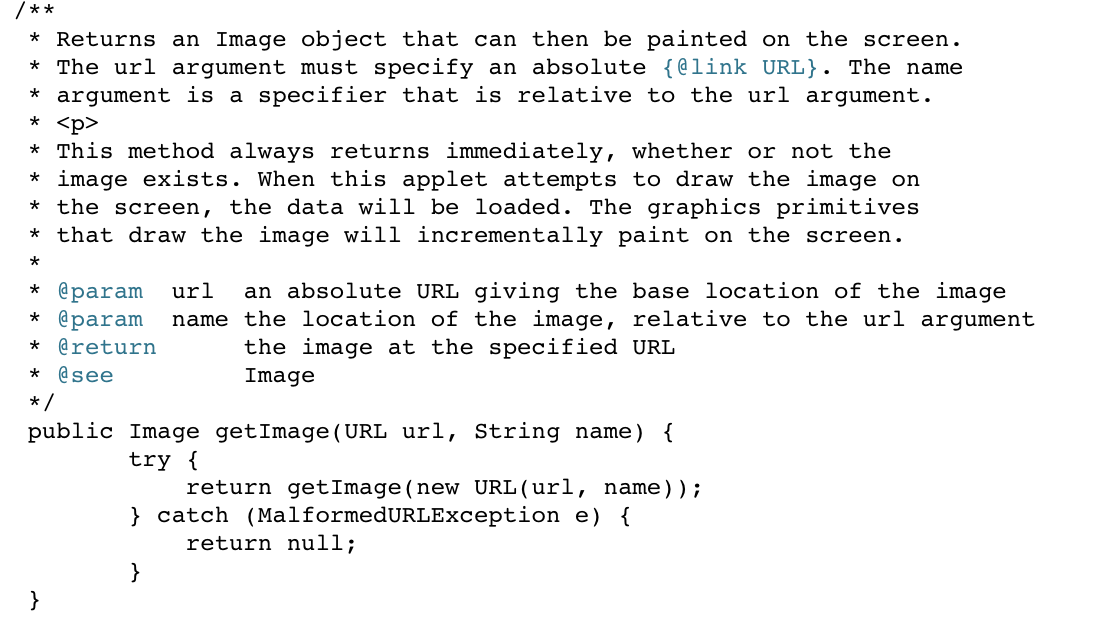
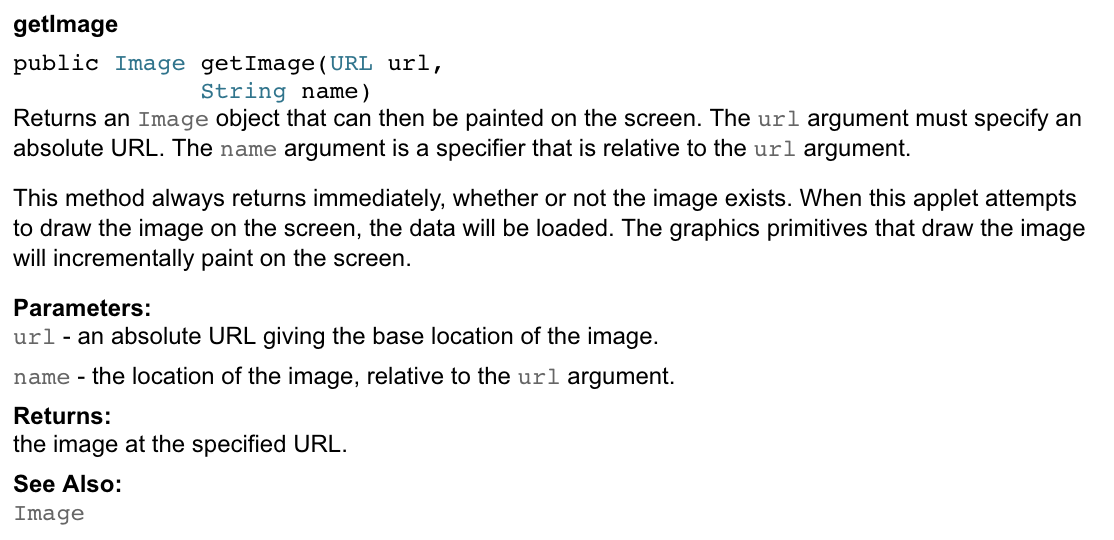
Javadoc – Documentation made easy

Java standardized the documentation process so everyone follows the same convention when documenting their code. You can easily read the required documentation instead of scratching your head on other people’s documentation.

Javadoc is created using a JDK javadoc tool. The tool converts the documentation to fresh, standard and easy HTML page.No hassle!

Example

Order of tags in javadoc:

  • @author – @author name-text
  • @version – @version version-text
  • @param – @param parameter-name description
  • @return – @return description
  • @exception – @exception class-name description
  • @see – @see reference
  • @since – @since release
  • @serial – @serial field-description | include | exclude
  • @deprecated@param parameter-name description

How to execute a Javadoc?

You just have to type javadoc <filename>.java

then go to the index.html file to see your doc

Layman’s Terms: You’re technically making someone else do all the work for you by them commands.

References: https://www.tutorialspoint.com/java/java_documentation.htm
https://www.oracle.com/technetwork/java/javase/documentation/index-137868.html#format

Multiple Default Methods in Inheritence

Back in the day, it was hard to add functionalities to inheritance without breaking the whole program., But now you can! How? You have to use default methods.

Whenever there is a need for a new method in inheritance, it can be done without implementing the method in every single class implementing the interface.

What are Multiple Default Methods?

Let’s consider a scenario. Let’s assume both A and B are interfaces containing a default method hugeCastle() and a class implements both interfaces. Which interface method would it implement? Oh, you don’t know. Here are a set of rules to help you.

  • If the implementing class has its own implementation for the default method, then that implementation will take priority over the others.
  • If the class doesn’t contain its own implementation, then an error will be thrown: “Duplicate default methods named displayGreeting inherited from the interfaces.”
  • In case when an interface extends another interface and both have the same default method, the inheriting interface default method will take precedence. Thus, if interface B extends interface A then the default method of interface B will take precedence.If the implementing class has its own implementation for the default method, then that implementation will take priority over the others.
  • Super Keyword: Use a super keyword like so, interface.super.method() to implement the needed method from a specific interface.

Example

interface Dad{
    default void throwTrash(){
        String where = "I don't care, I am drunk";
        System.out.println("I am going to throw the trash in the.... " + where);

    }
}
interface Mom{
    default void throwTrash(){
        String where = "in your Dad's man cave";
        System.out.println("I am going to throw the trash in the.... " + where);

    }
}
class DefaultMethod implements Mom, Dad{
    @Override
    public void throwTrash(){
        //Dad.super.throwTrash();
        //Mom.super.throwTrash();           //Implements mom's method of throwing away trash
        //String where = "in the trash can";
        //System.out.println("I am going to throw the trash in the.... " + where);        //Implements the child's way of throwing the trash
    }
    public static void main(String[] args) {
        DefaultMethod dm = new DefaultMethod();
        dm.throwTrash();
    }
}

Layman’s Terms

When both your parent ask you throw out garbage but both of them specified different locations to dispose of the trash, what would you do? That’s how java feels. You can either throw wherever you want or use a super keyword and listen to one of them specifically. And Lastly, if it was your grandpa and your dad telling you to throw the trash out, you got the listen to your grandpa because he’s the man and top of the hierarchy.

References

https://www.programcreek.com/2014/12/default-methods-in-java-8-and-multiple-inheritance/
https://netjs.blogspot.com/2015/05/interface-default-methods-in-java-8.html

Can a Semaphore act as a Mutex?

ANSWER: Let’s define both these terms.
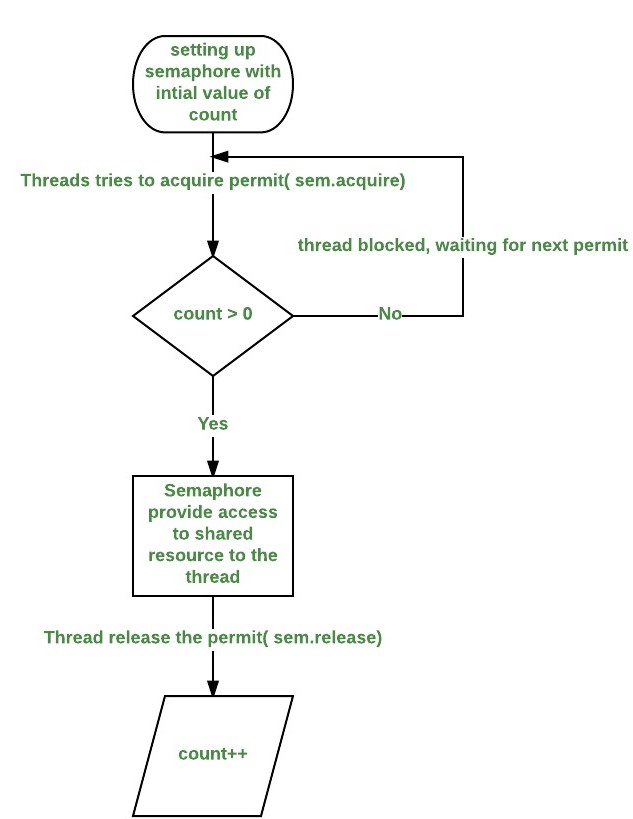
Semaphore: A semaphore control access to a shared resource using a counter. The counter measures the number of permits that are allowed. If a counter is zero, then access to the resource is denied. If it is greater than zero, then access to the resource allowed. Every time a thread acquires a resource, the counter is decremented. When it is done using the resource, it releases the resource and the counter is incremented. Lastly, when the counter is zero, any thread that needs access to the resource has to wait for another thread to release the resource.

Mutex: Mutex stands for mutual exclusion. When only one thread is allowed to have access to the thread at a time, it is called a mutex. Another thread has to wait for the resource to be freed in order to use it.
Important note: A semaphore can be a mutex when the semaphore counter permits only one resource. In this case, there is only one resource is available for allocation at that specific time.

What is meant by Java being platform independent.

This image has an empty alt attribute; its file name is java-virtual-machine.png
As you can see, the java code you write is first compiled. Then it is transformed into the Byte Code which is a .class file. That is the file that is created in the same directory when you compile the program. This

ANSWER: Java is platform independent as it can be used on any system regardless of having different operating systems and file systems. The way it does this by using the Java virtual machine (“JVM”). Look at the flow chart below for how it does it.

What’s the difference between a class method and an instance method?

ANSWER: Class methods are declared as static hence they can be called without creating an instance of a class. Class methods can only operate on class members and not on instance variables since they are unaware of the instance members.
In order to use an instance method, you must create a instance of a class using the new keyword. Also instance methods are not declared as static.
Example: <class_name> <object_name> = new <constructor>;

Difference between Abstract vs. Interface

Abstract

  • An abstract class can’t be instantiated, but it can be subclassed. An abstract class usually contains abstract and non-abstract methods that subclasses are forced to provide an implementation for.
  • Abstract class doesn’t support multiple inheritance 
  • Abstract class can have final, non-final, static and non-static variables 
  • Abstract class can have static methods, main method and constructor
  • Abstract class can provide the implementation of interface 
  • The abstract keyword is used to declare abstract class.
  • Abstract classes can be indirectly instantiated via subclasses

Interface

  • An interface is a completely “abstract class” that is used to group related methods with empty bodies.
  • You can use an interface to define a contract/template for the objects to follow. So, any class that implements the interface, they have to use all the methods in the interface.
  • Interface can have only abstract methods 
  • Interface supports multiple inheritance
  • Interface has only static and final variables 
  • Interface can’t have static methods (until Java 8), main method or constructor. 
  • Interface can’t provide the implementation of abstract class 
  • The interface keyword is used to declare interface

Java – While Statements

What is the difference between while and do while loop?

Do while

The do while loop will check the condition at the end of the loop. This way, the code inside the loop will be executed atleast once.

Example

class Workout{
    int reps = 10;    int sets = 0;    int total_reps = 0;    Workout(){        
do {            
     total_reps = total_reps + reps;           
     sets++;            
     System.out.println("Total reps:"  + total_reps);        
     } while (sets < 4);        
     return ;
    }
        public static void main(String[] args) {            
            Workout swole = new Workout();    
          }
}


Control-Flow

While Loop

The while loop checks a given condition. If the statement is true, the loop will be executed, else it will stop looping and move on to the next piece of code.

Difference between while and do while loop:

The while loop starts executing once the condition is checked and the do while will execute once (even if its false) and then check the condition.

while(condition = true){
Jake = smart;
}
view raw while.java hosted with ❤ by GitHub

Java – Loop-and-a-half repetition control

Loop-and-a-half repetition control statements are used to control the flow of the loop. You wouldn’t want to run a loop forever. There will come a time when you need to stop a loop earlier and you can use the following statements to implement it:

  • break;
  • if statement
  • while statement

Example

import java.util.*;

class Running{
    int forest_gump;
    int months = 0;
    void method() throws InterruptedException{
        while(true){
            months++;
            System.out.println("Forrest is running for:" + months + "months now");
            Thread.sleep(500);
            if (months > 38){
                System.out.println("Forrest is tired");
                break;
            }
        }
    }
    
        public static void main(String[] args) {
            Running run_forest_run = new Running();
            try{
                run_forest_run.method();
            }
            catch(Exception e){

            }
        }        
}

The break statement breaks out of the while loop when the if condition is met. Forrest Gump felt tired after 38 months so he just stopped running.

You have to be careful working with infinite loops. They can create complexities and unintentional shutdowns.
There are also multiple exit points that can be taken during a run of a loop. You can put multiple if statements throughout the program to come out of the loop. You just have to make sure you do it as efficiently as possible.

Java Interview Questions

1. What’s the difference between Abstract vs. Interface?

ANSWER: An abstract class can’t be instantiated, but it can be subclassed. An abstract class usually contains abstract and non-abstract methods that subclasses are forced to provide an implementation for.
An interface is a completely “abstract class” that is used to group related methods with empty bodies.
You can use an interface to define a contract/template for the objects to follow. So, any class that implements the interface, they have to use all the methods in the interface.

Layman’s terms: An abstract class is like chill art class teacher while an interface is like a strict science teacher.

2. Whats the difference between a class method and an instance method?

ANSWER: Class methods are declared as static hence they can be called without creating an instance of a class. Class methods can only operate on class members and not on instance variables since they are unaware of the instance members.
In order to use an instance method, you must create a instance of a class using the new keyword. Also instance methods are not declared as static.
Example: <class_name> <object_name> = new <constructor>;

Layman’s terms: A class method is like talking to your family/cousins while an instance method is like talking to like a professor where you have to declare them as “prof” or “Mr.” or “Mrs.”.

3. When do you use abstract class?

ANSWER: You can use an abstract class when you want to make a partial define class. What it means is that you have provide implementation details for any class that extends the abstract class. Hence, the children classes inherit the abstract method(s).

Layman’s terms: You only inherit a few traits from your mom and dad hence your mom and dad are abstract classes.

4. Why do people use nested classes?

ANSWER:
– Child – Parent connection is simpler.
– Increases encapsulation.
– Increases readability and maintainability.

Layman’s terms: Wouldn’t it be easier to live in the same house as your parent enclosed in their protection.

5. What is meant by Java being platform independent.

ANSWER: Java is platform independent as it can be used on any system regardless of having different operating systems and file systems. The way it does this by using the Java virtual machine (“JVM”). Look at the flow chart below for how it does it.

As you can see, the java code you write is first compiled. Then it is transformed into the Byte Code which is a .class file. That is the file that is created in the same directory when you compile the program.

Layman’s terms: Java code is like a person that knows every language and can communicate with everyone in the world.

6. Can a Semaphore act as a Mutex?

ANSWER: Lets define both these terms.
Semaphore: A semaphore control access to a shared resource using a counter. The counter measures the number of permits that are allowed. If a counter is zero, then access to the resource is denied. If it is greater than zero, then access to the resource allowed. Everytime a thread acquires a resoruce, the counter is decremtned. When it is done using the resource, it releases the resource and the counter is incremented. Lastly, when the counter is zero, any thread that needs access to the resource has to wait for another thread to release the resource.

Flowchart of a Semaphore

Mutex: Mutex stands for mutual exclusion. When only one thread is allowed to have access to the thread at a time, it is called a mutex. Another thread has to wait for the resource to be freed in order to use it.

Important note: A semaphore can be a mutex when the semaphore counter permits only one resource. In this case, there is only one resource is available for allocation at that specific time.

Layman’s terms: Semaphores are like going to a club. You can go in as long as there is room in there. When someone comes out, you can go in. Mutex is like a bathroom, only one person at a time.

Design a site like this with WordPress.com
Get started